
“Please check your email for the invoice” often means “please wait while the customer never finds it.”
In many markets, WhatsApp is where payment conversations already happen. Sending a clear PDF invoice or document there shortens time-to-pay, reduces “please resend” loops, and keeps the discussion in one thread.
This guide covers when WhatsApp documents make sense, how templates and attachments work at a high level, and how Pyngdesk helps teams design and send invoice PDFs.
When WhatsApp invoices beat email
WhatsApp is a strong channel when:
- Customers are used to chatting with your number for orders
- Field sales or shop counters close deals in person, then need a PDF immediately
- Accounting already lives in tools like Tally, and ops want fewer manual forwards
- You need a readable paper trail inside the same support conversation
It is a weaker fit when enterprise procurement requires email-only AP processes — in that case, dual-send (email + WhatsApp) may still help the buyer’s champion.
Compliance and expectations
- Prefer utility-style communication for invoices and payment reminders tied to a real transaction
- Do not use invoice PDFs as a trojan horse for unrelated marketing spam
- Keep amounts, GST/tax lines, and legal entity names accurate — WhatsApp does not relax accounting law
- Honour requests to stop promotional follow-ups; still allow legitimate invoice delivery where appropriate
Meta policies and local regulations both apply. When in doubt, keep messages transactional and precise.
Document messaging patterns
Pattern 1 — Invoice after purchase
- Confirm order in chat or via template
- Send PDF invoice
- Share UPI / payment link if relevant
- Continue in Chats until paid or closed
Pattern 2 — Payment reminder
- Utility template: amount due + due date
- Re-attach PDF if needed
- Offer human help for disputes
Pattern 3 — Quote / proforma
- Send quote PDF
- Buttons or quick replies: Approve / Ask change
- Convert to invoice on acceptance
Designing PDFs people can read on a phone
Mobile PDF UX is unforgiving:
- Keep to one page when possible for simple retail invoices
- Large enough fonts; avoid microscopic line items
- Clear Invoice #, Date, Amount due, Business name
- High-contrast text; skip heavy background textures
- Filename that makes sense (
Invoice-1042.pdf)
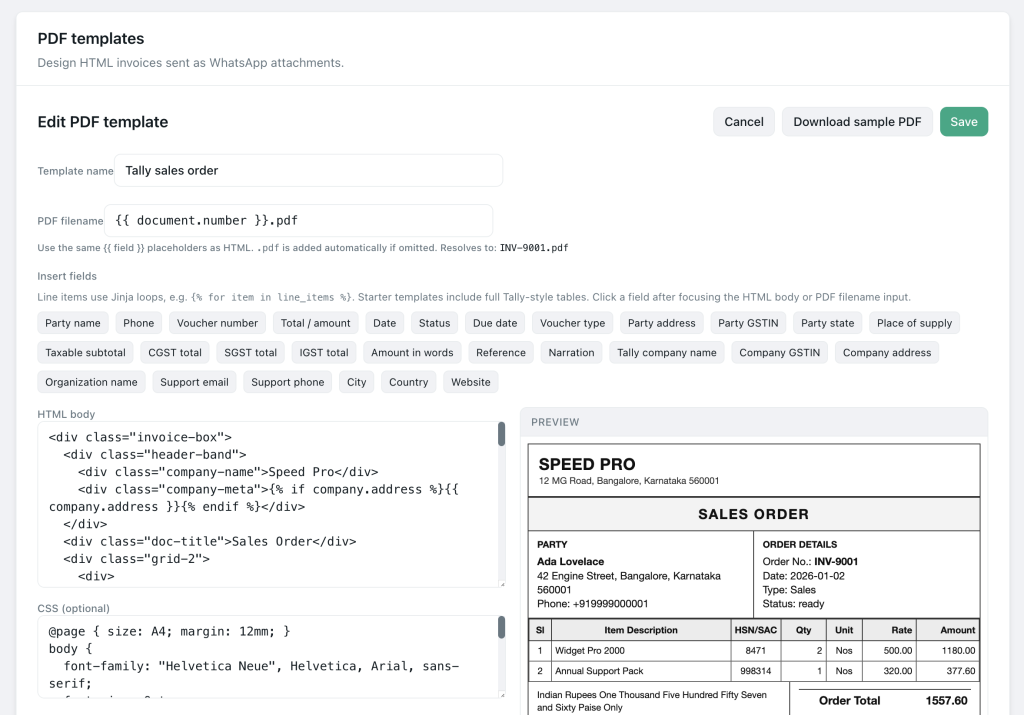
In Pyngdesk, PDF templates under Integrations let you design HTML layouts rendered to PDF for WhatsApp attachments — including Tally-oriented voucher layouts where configured.
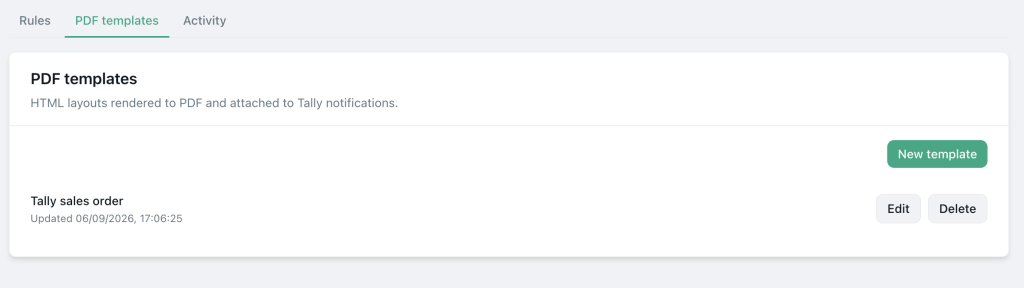
Path: Integrations (/integrations) → provider / PDF templates panel (invoice HTML editor and samples).
Operational setup with Pyngdesk
- Connect WhatsApp via WhatsApp setup (
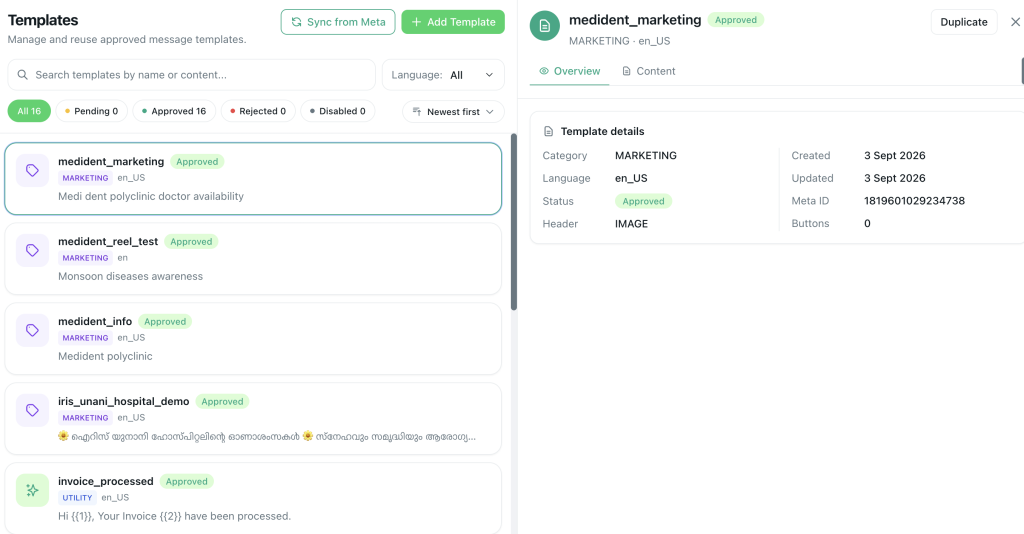
/whatsapp/onboarding). - Approve any required message templates for outbound invoice notices (
/templates). - Configure PDF templates for your invoice layout.
- Connect TallyConnect or other integrations if invoices originate in accounting software (see the sibling Tally guide).
- Train staff: when sending manually from Chats, confirm the correct contact and amount before attaching.
- Store customer GSTIN / billing fields on the contact where useful for repeat invoices.
Template body + PDF together

A strong pattern is:
Template text: “Hi {{1}}, invoice {{2}} for {{3}} is attached. Due by {{4}}. Reply if you have a question.”
Attachment: the PDF
The text sets context; the PDF carries the legal/commercial detail. Do not send a silent document with no caption when the API path allows explanatory text.
Avoid these mistakes
| Mistake | Better approach |
|---|---|
| Huge multi-page scans | Regenerated digital PDF |
| Wrong contact / forwarded group chaos | Send from org inbox to the right contact record |
| Marketing blast with “invoice” bait | Real invoices only; honest category |
| No payment instructions | Include method or “reply for UPI” |
| Staff emailing PDFs personally | Standardise via Pyngdesk templates/integrations |
Metrics that matter
- Median time from “invoice requested” to “PDF delivered”
- Payment cycle time before vs after WhatsApp delivery
- Resend rate (“please send again”)
- Dispute rate (wrong amount / wrong firm name) — fix the template
Invoice-on-WhatsApp checklist
- Legal business details correct on the PDF
- Mobile-readable layout tested on a phone
- Utility template approved if sending outside open windows
- PDF template saved in Pyngdesk
- Staff know the Chats send path vs automated path
- Payment instructions included
- No promotional pile-on attached to every invoice
Frequently Asked Questions
Is a WhatsApp PDF a legally valid invoice?
WhatsApp is a delivery channel. Whether the PDF meets invoice rules depends on your jurisdiction and the document contents — not the messenger.
Can customers download and keep the file?
Yes — documents behave like normal WhatsApp attachments on their device.
Do I need Tally?
No. TallyConnect is optional for accounting-led workflows. You can still use PDF templates and chat attachments for simpler setups.

Leave a Reply
You must be logged in to post a comment.