If you are moving from the WhatsApp Business app to the WhatsApp Business API, this is the first rule that catches teams off guard:
You cannot type whatever you want, whenever you want.
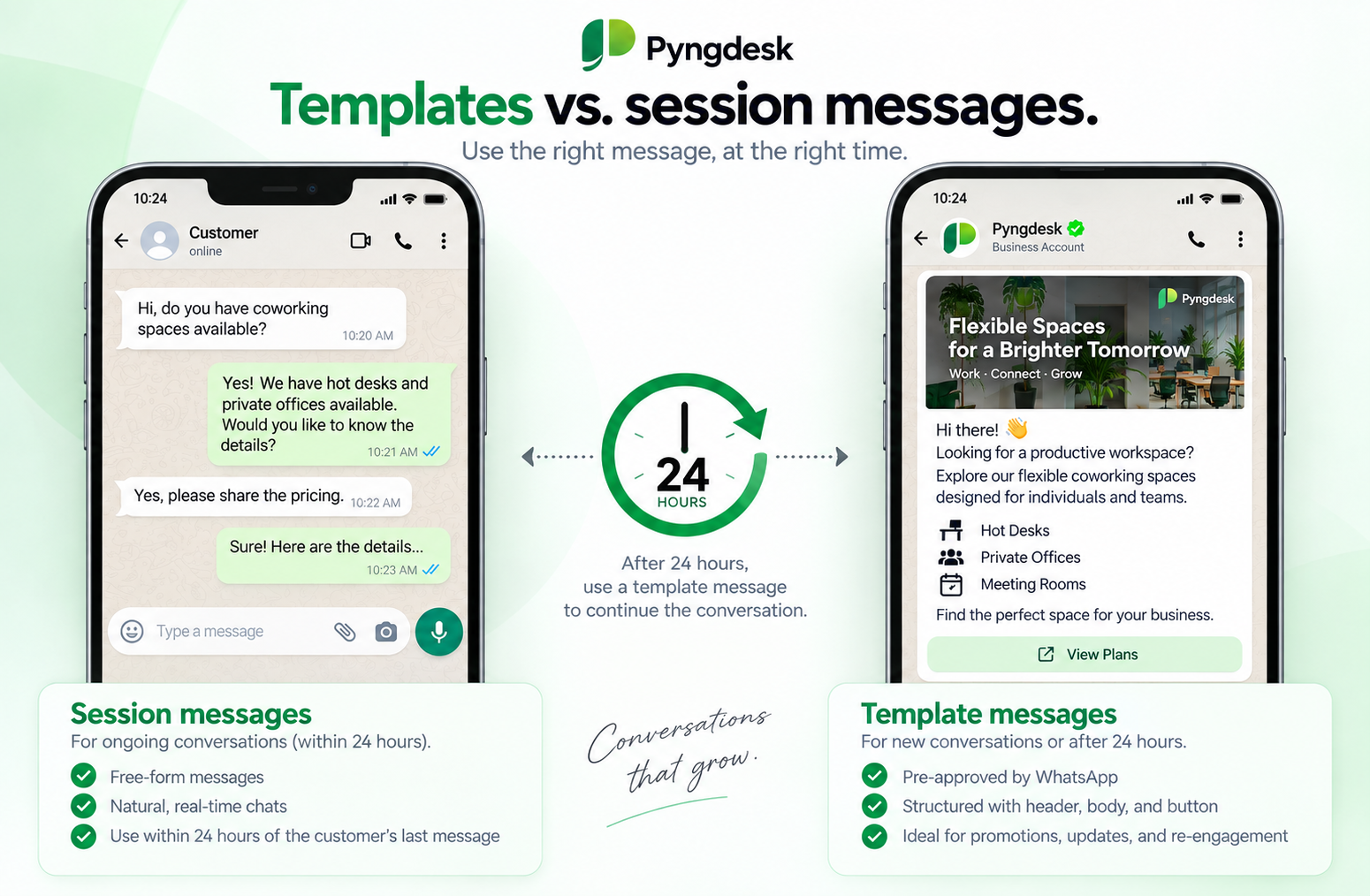
On the API, outbound messages fall into two buckets: session messages (free-form replies inside a 24-hour window) and template messages (pre-approved by Meta, used to start or reopen a conversation). Mix them up and messages fail, campaigns stall, and your quality rating can drop.
This guide explains the difference in plain language — when each type is allowed, what it costs in practice, and how to run both correctly in Pyngdesk.
The 24-hour customer service window (the rule everything hangs on)
When a customer messages your business, Meta opens a customer service window for 24 hours from that inbound message.
Inside the window you may send free-form content: text, photos, PDFs, voice notes, locations — the same kind of reply you would type in a normal chat.
Outside the window you may not send free-form text. To reach that person again you must send a Meta-approved template. If they reply, a new 24-hour window opens and you can go back to free-form replies.
The window is measured from the customer’s last inbound message, not from your last outbound. If you send five replies and they stay silent for 24 hours, the window closes.
Typical timeline:
- Customer writes “Hi, is my order shipped?” at 10:00 AM Monday.
- Your team (or a flow) replies in the chat — session messages, no template needed.
- At 10:00 AM Tuesday, if they have not written again, the window is closed.
- To follow up (“Your order is out for delivery”), you send a utility template.
- They reply “Thanks!” — a new 24-hour window opens. You can send a free-form “You’re welcome” without a template.
That cycle is the entire WhatsApp Business API conversation model. Templates start (or reopen) conversations. Session messages continue them.
What is a session message?
A session message (also called a service message or free-form message) is any non-template message you send while the 24-hour window is open.
You can send:
- Plain text
- Images (JPEG, PNG, WebP)
- PDFs
- Audio and voice notes
- Location pins
- Interactive messages (buttons, lists) from flows and automations
No Meta review. No template name. Type it, send it, done.
What session messages are for: support, sales follow-up, clarifying an order, answering a question the customer just asked. They should feel like a human (or a well-designed bot) continuing a conversation the customer started.
What they are not for: blasting a list, re-engaging people who went quiet last week, or sending a promo to someone who has not written in. Those need templates — and explicit opt-in if the content is marketing.
In Pyngdesk, session messages are what you type in Chats. The composer supports text, attachments, voice notes, and location. Each chat in the list shows a small status dot:
- Green — inside the 24-hour window (“Can message freely”)
- Red — window closed (free-form send will fail at Meta)
You can filter the inbox to Can message freely or Window closed so agents do not waste time typing into chats that need a template instead.
What is a template message?
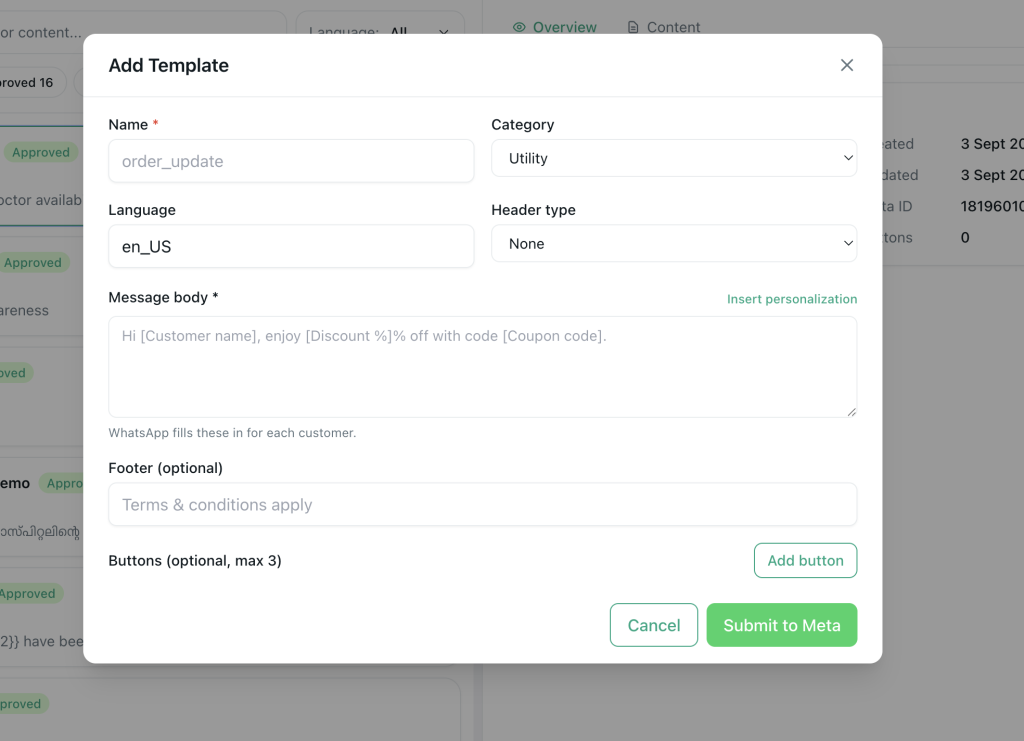
A template message is a pre-written message that Meta has reviewed and approved for your WhatsApp Business Account (WABA). It has:
- A name (e.g.
order_shipped,summer_sale) - A category: Marketing, Utility, or Authentication
- A language (e.g.
en_US) - A body (and optional header, footer, and buttons)
- Optional variables such as
{{1}}for the customer’s name or order ID
Until status is Approved, you cannot send it. Pending, rejected, or disabled templates will not go out — and they will not appear in Pyngdesk’s campaign builder.
What templates are for:
- Starting a conversation with someone who opted in but has not written recently
- Reopening a chat after the 24-hour window closed
- Broadcasts and campaigns
- Transactional updates (shipping, appointments, invoices) that must land even if the customer is silent
- One-time passwords and login codes
What they are not: a loophole to send spam. Marketing templates still require opt-in. Utility templates must actually be utility (order updates, reminders) — labeling a promo as utility is a common way to get the template rejected or the number restricted.
In Pyngdesk, create templates under Templates (/templates). Choose category, write copy with personalization fields, add optional header media and buttons (reply, URL, or call), and submit. Status syncs from Meta: Pending, Approved, Rejected, or Disabled. Only approved templates can be used in Campaigns or for outbound re-engagement.
Side-by-side: templates vs session messages
| Session messages | Template messages | |
|---|---|---|
| When you can send | Only inside the 24-hour window after the customer last wrote | Anytime (subject to opt-in, quality, and rate limits) |
| Approval | None | Meta must approve the template first |
| Content | Free-form: whatever you type or attach | Fixed structure; only variables change per recipient |
| Typical use | Support replies, live sales, bot follow-ups | Campaigns, reminders, OTPs, “we haven’t heard from you” |
| Inbox in Pyngdesk | Chats composer | Templates + Campaigns (and integrations / flows that send templates) |
| Personalization | Ad-hoc | Mapped variables (name, order ID, custom fields) |
| Media | Image, PDF, audio, voice, location as you send | Header can be image, video, or document if the template was built that way |
| If you get it wrong | Meta rejects the send (error on the message) | Failed campaign recipients, rejected templates, quality risk |
Short version: session messages are the conversation. Templates are the knock on the door.
Template categories (this is not just a label)
Meta prices and polices templates by category. Pick the wrong one and you either overpay or get rejected.
Utility
Operational messages the customer already expects: order shipped, appointment tomorrow, payment received, invoice attached.
Use utility when the content is about their transaction or account — not a new offer. In Pyngdesk this is the default category on the create-template form, and it is what most Shopify / WooCommerce / TallyConnect notification rules should use.
Marketing
Offers, restocks, newsletters, “we miss you” campaigns, anything promotional.
Requires prior opt-in. These templates are reviewed more strictly. High block or report rates on marketing templates hurt quality rating faster than utility.
Authentication
OTPs, login codes, verification. Tight format rules. Do not use this category for anything else.
In Pyngdesk the template list shows category badges (Utility, Marketing, Authentication) so ops and marketing do not mix them up when building a campaign.
Cost: why the distinction shows up on your bill
WhatsApp Business Platform charges are set by Meta and vary by country. The business rule of thumb:
- Session / service replies inside the 24-hour window are typically the cheapest way to talk — in many markets they are free or billed at a service rate.
- Utility templates cost more than a session reply, but less than marketing, and they work when the window is closed.
- Marketing templates are usually the most expensive per message.
- Authentication has its own rate card.
So the expensive mistake is not “using templates.” It is using a marketing template when a session reply would do, or sending a utility template to reopen a chat when the customer already wrote five minutes ago and you could have answered in Chats for far less.
A healthy pattern:
- Customer messages you → reply in Chats (session).
- Need to notify thousands who have not written lately → approved utility or marketing template via Campaigns, with throttling.
- Order event from Shopify → utility template via an integration rule, not a free-form blast.
Pyngdesk does not set Meta’s rates. It does keep session work in the inbox and template work in Templates / Campaigns / integrations so teams do not “just type a promo” into a closed window.
How to choose in 10 seconds
Ask two questions:
- Did this person message us in the last 24 hours?
- Yes → session message in Chats.
- No → you need an approved template.
- Is this promotional or operational?
- Promotional → Marketing template + documented opt-in.
- Order / appointment / account → Utility template.
- OTP → Authentication template.
If you are unsure whether the window is open, look at the chat in Pyngdesk. Green dot = session is allowed. Red dot = template only.
Common mistakes (and how they show up)
Sending free-form text after the window closed.
The message fails. In Chats it will show as failed. Filter Window closed and send a template (or wait for the customer to write). Do not retry free-form — it will keep failing and can look like abuse.
Using a marketing template without opt-in.
Blocks, reports, quality rating drop. Same rules as campaigns: consent first. See How to Run Your First WhatsApp Campaign Without Getting Blocked.
Calling a promo a utility template.
Meta rejects it, or approves it then later flags quality. If it is an offer, it is marketing.
Starting every conversation with a template even when the customer just wrote.
Waste of money and slower for the customer. Train agents to check the green/red indicator before reaching for a template.
One giant marketing template for every use case.
Variables cannot paper over a vague body. Keep utility templates specific (order_shipped, appointment_reminder) and marketing templates honest about the offer.
Ignoring the window on automations.
Flows that send interactive or free-form nodes assume an open window. After 24 hours of silence, the next outbound step should be a template — or the flow should wait for the customer.
How this works day to day in Pyngdesk
Inbox (session)
- Open Chats.
- Use the Filter menu: Can message freely (open window) or Window closed.
- Open a green-dot chat and reply with the composer (text, image, PDF, voice, location).
- Use Quick Replies for canned session answers so agents stay consistent without submitting a new template.
Templates (re-open or broadcast)
- Open Templates.
- Create a template, pick Utility / Marketing / Authentication, add body, optional header, buttons, and variables.
- Submit and wait for Approved.
- Use it in Campaigns for lists, or map it on a Shopify / WooCommerce / TallyConnect notification rule for event-driven utility sends.
Campaigns (templates only)
Campaigns never send session messages. They only list approved templates. That is intentional: a broadcast is, by definition, reaching people who did not just message you.
A simple operating model for teams
| Situation | Message type | Where in Pyngdesk |
|---|---|---|
| Customer asked a question 10 minutes ago | Session | Chats |
| Agent needs a standard FAQ answer in an open chat | Session (Quick Reply) | Chats + Quick Replies |
| Bot collecting order details after the customer said “hi” | Session / interactive | Flows |
| “Your appointment is tomorrow at 3pm” to 200 people | Utility template | Campaigns or integration rule |
| Festival offer to tagged opt-in list | Marketing template | Campaigns (throttled) |
| Login OTP | Authentication template | Your auth flow → template send |
| Customer went quiet 3 days ago; you need a shipping update | Utility template | Template send / campaign / integration |
If every agent and marketer on the team can fill that table from memory, you will rarely hit Meta errors.
FAQ
No. There is no window until they message you (or you open one with an approved template and they reply). First contact is always a template, and marketing first contact needs opt-in.
The window opens when they reply, not when your template is delivered. After a template, you still cannot free-form until they respond (unless you send another template).
No. Inside the window, attach the image in Chats. Template header media is for templates, typically when the window is closed or you are broadcasting.
Usually category mismatch, misleading copy, prohibited content, or a sample that does not match the variables. Fix the copy in Templates, resubmit. Pyngdesk shows the rejection reason on the template.
The 24-hour idea is similar, but the API is stricter: no free-form outside the window, templates must be approved, and quality is scored on the WABA. Do not assume “it worked in the green app” will work on the API.
Automations can send structured messages while a session is open. For closed-window or list outreach, use approved templates via campaigns or integration rules — not a free-form flow node.

Leave a Reply
You must be logged in to post a comment.